
Download the worksheet
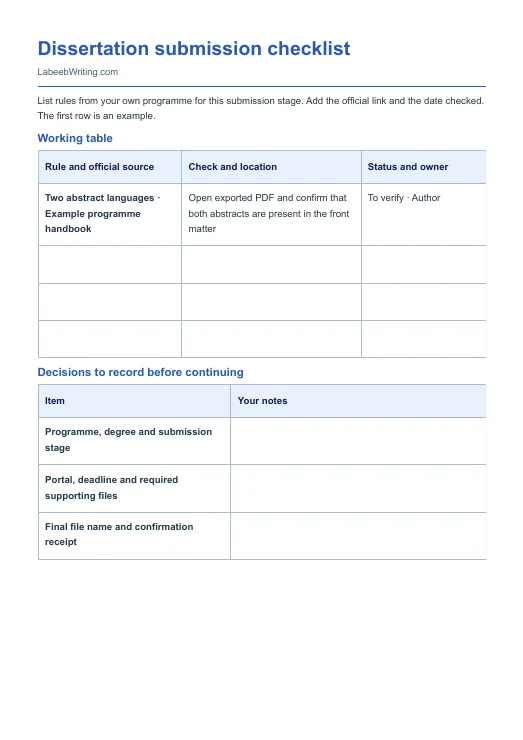
Dissertation submission checklist
Record the source, verification location and status for the rules that apply to your submission.
Identify the submission you are making
The file for the examiner, the corrected file and the final repository deposit can have different requirements. Record the stage, degree, programme, official guidance link, date checked, deadline, contact and submission portal before you start. Use the current programme instructions for conflicts.
Check the document and supporting files
- Compare title, name, degrees, declaration, abstract language and any word limits with the required front matter.
- Refresh the contents and figure or table lists in the final Word file. Compare page numbers and section changes against the PDF.
- Check that figures, transcripts or appendices can be shared and that datasets, confidential material and embargo conditions follow your instructions.
- Confirm the accepted file type, naming, limits and any signed, anonymised or separately uploaded forms.
Work one issue through to closure
Example: your programme asks for Arabic and English abstracts, but the English abstract is missing from the PDF after export. Enter the official rule and section, adjust the source file, export again, then record the page where both abstracts appear. This example illustrates how to document a check. Use your own programme’s actual rule.
Keep a dated copy and the receipt
Retain the exact submitted file and portal confirmation. Open the uploaded version where the portal allows it. If a correction is requested later, create a new version and preserve the examiner copy so page references in the feedback remain traceable.
Identify who sets the rule for this submission
A university handbook may cover all degrees, while the graduate school or department gives different instructions for your programme and submission stage. Verify the document title, revision date and audience. For a conflict, ask the office that accepts the file and keep the response with your checklist. Record institution-specific instructions before formatting the entire document.
An examination copy and a repository copy can have different anonymity, file or access requirements. Create one checklist per stage. Mark which instructions have formal confirmation, which depend on your degree or portal, and who can answer the remaining questions.
Open the files the recipient will actually see
- Check the final Word file after refreshing the table of contents, captions and cross-references. Follow the front-matter numbering into Chapter 1 and then into a landscape section or appendix.
- Open the exported PDF independently. Compare the title page and abstract requirements, click a table-of-contents entry and find a mixed Arabic/English page containing a table, name or DOI.
- Check any supporting declaration, supplement or tracked file against the actual upload instructions. Verify names, versions and file sizes before submitting.
- Keep the successful receipt or confirmation and store a copy of the exact files submitted. Distinguish preparation checks from portal receipt.
Work through a correction that changes page numbers
In a fictional pre-deposit review, a student adds an approved statement before the abstract. This shifts the locations of all later front-matter sections. Update the Word field references, then export again and check the abstract and first chapter in the saved PDF. Recheck any checklist entry that records the old page number.
Sources
Frequently asked questions
Does a university thesis template settle all requirements?
Confirm which template and revision apply to your degree. Some institutions publish separate files by thesis type, submission stage or language. Check the portal and current programme instructions as well.